Wednesday, October 31, 2007

SANS Auditing Wireless Networks Mentor Led Training

So I'm going to shamelessly plug a great course. I'm going to be mentoring the SANS 617 Auditing Wireless Networks track in NYC next year starting March 25th.

This track is ideal for auditors, network administrators and penetration-testers who are responsible for assessing the security of wireless networks. This is a great track to gain and develop the skills needed to analyze wireless networks.

So if you are in NYC, and can get your company to send you, you should sign up. It's a great track and was authored by Joshua Wright, the creator of tools such as the LORCON Framework, coWPAatty, asleap and file2air to name a just a few.

Cheers,

Dean

Sunday, October 21, 2007

Security Data Visualization: Graphical Techniques for Network Analysis by Greg Conti Book Review

Security Data Visualization: Graphical Techniques for Network Analysis by Greg Conti

5 Stars

If you want to get into security visualization this is the book for you. This book gives you everything you need to get started in the field. You may be asking yourself why you should care or want to be interested in Security Visualization. In Chapter 1 the author sums it up nicely. “Visualizations make abstract data more coherent...In many cases, visualizations seek to display large amounts of information in a compact but useful way.”


Before we get into the review, I'll disclose that I know the author and he gave me a review copy. I don't think this makes it easier for the author to get a good review, in fact, I think it makes it harder because I expect a lot from the author. Its his fault I'm into computer and information security and I have taken courses that he taught, so he had high expectations to meet.


The first three chapters, An Overview of Information Visualization, The Beauty of Binary File Visualization, and Port Scan Visualization give you all the background you need to get started and introduce you to the author's visualization tool, RUMINT. It was interesting to see the difference between nmap and unicornscan and paves the way to create signatures for all types of port scanners based on their default behavior. Chapter 4, Vulnerability Assessment and Exploitation, walks us through analyzing a dataset with an attack using the Metasploit Framework, very interesting and shows us that even with metasploit's built-in IDS evasion, in the end it must create sockets and connections and those can be seen with visualization tools (with the proper tweaking and analysis). I read the sample chapter available (CH 5, One Night on My ISP) before I read the whole book, and it was certainly easier to follow after reading the previous chapters. I think it gives you a good taste of what you can do with security visualization tools and what the book can teach you but can be hard to follow without the background material in the previous chapters. Chapter 6, A Survey of Security Visualization, gives us an overview of how other security researchers are solving security problems with different types of visualization. Chapters 7 (Firewall Log Visualization) & 8 (Intrusion Detection Log Visualization) written by the guest author Raffy Marty uses his tool “AfterGlow” to examine firewall logs and Treemaps to try to organize the volumes of IDS data. Chapter 9, Attacking and Defending Visualization Systems, shows us some sample attacks that attackers could use to thwart security visualization tools. The occlusion and windshield wiper attacks were interesting as well as the idea of using graphical attacks to send images to the analyst. Chapters 10-12, Creating a Security Visualization System, Unexplored Territory & Teaching Yourself, closes out the book with discussions and thoughts on building your own security visualization tools, areas of future research and obviously ways to help teach yourself security visualization.


Some likes and dislikes. I liked that the author regularly points us to background material and extra reading for every section. Each section could pretty much be a book in itself so links to more reading and current research was helpful for the specific areas that peeked my interest. I really liked that the book was in color, I don't see the book being near as effective in black and white. I liked the guest author's take on visualization, it was nice to get a second opinion in the same book and it was extremely nice that they didn't cover the same material like a lot of books that have multiple authors seem to do. Lastly, I liked that the author had created his own tool to do some of the visualization and that its freely available on the tool's site. I was able to get up and running with RUMINT from the material in the book and the how-to on the site.


For dislikes, it would have been nice to have access to some of the scripts mentioned in the book. Hopefully the author will post those on his site. I didn't care for the font of the book, Times New Roman, small times new roman font got a little tiresome of reading after a chapter or two (minor gripe)

Overall, a great book and highly recommended to anyone interested in getting started with security visualization.


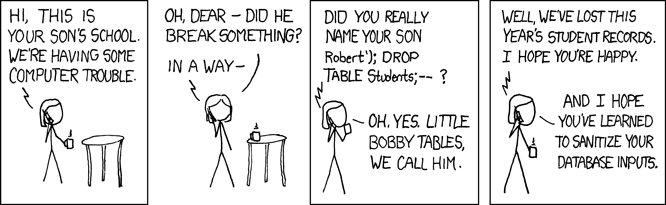
Sunday Comic


Since everyone else is posting it...

Crash Course In Penetration Testing Workshop at Toorcon

Just got back from doing a workshop with Joe at Toorcon. It was titled Crash Course in Penetration Testing

here is the blurb from the toorcon page:

"This course will start with the basics of pen-testing methodology covering Footprinting, Scanning, Enumeration, and Exploitation which will cover attacking Web Apps, Buffer Overflows, and will set you loose on a set of rootwars challenge servers. The course will come with a complementary USB Harddrive loaded with an attack VM and challenge VM images for you to play with so you can continue to hone your skills and learn new techniques even after the course is finished. Attendees will walk away with a working knowledge of how to pen-test a network, all of the basic tools needed, and a set of exercises that they can use to improve their skills."

All in all, I thought it went really well. we maxed out attendance (actually 2 over), the class was engaged and interested and responsive, so that's always good. What I thought was cool about the workshop is that we gave out 250GB hard disks with all the tools, Virtual Machines, and extra reading to the students. we had a minor issue with the firmware on the drives that they wouldn't mount under linux, so that's a good point for future classes where we do the same thing (not to get those types) but like I said we came away feeling like it went well.

Because Joe is a Pen-tester for his day job, he did most of the talking, but I chimed in when I had something to say and I, of course, did the metasploit section because I am a fanboy.

we really didnt have time to talk Buffer Overflows but we covered the other topics and tried to break them out based on if you are looking at a network internal or external and how to approach it from those perspectives.

I think we are going to run an online version on LSO for members, it will run for about a week each iteration.

Saturday, October 13, 2007

Firewall & VPN Identification with Ike-Scan

Sometimes nmap will tell you what you exactly what you are up against...

cg@segfault:~$ nmap -A 192.168.1.15

Starting Nmap 4.20 ( http://insecure.org ) at 2007-10-13 14:58 MDT
Interesting ports on (192.168.1.15):
Not shown: 1694 filtered ports
PORT STATE SERVICE VERSION
80/tcp open http Cisco VPN Concentrator http config
443/tcp open ssl/http Cisco VPN Concentrator http config
10000/tcp open snet-sensor-mgmt?
Service Info: Device: terminal server

Sometimes it wont tell you crap... :-(

cg@segfault:~$ nmap -A 192.168.1.11 -P0 -p 1-65535

Starting Nmap 4.20 ( http://insecure.org ) at 2007-10-13 00:34 MDT
All 65535 scanned ports on depcon (192.168.1.11) are filtered

Nmap finished: 1 IP address (1 host up) scanned in 13122.065 seconds


If you suspect that its a firewall or VPN concentrator you can use ike-scan to help test your theory.

root@segfault:# ike-scan 192.168.1.11
Starting ike-scan 1.9 with 1 hosts (http://www.nta-monitor.com/tools/ike-scan/)
192.168.1.11 Notify message 14 (NO-PROPOSAL-CHOSEN) HDR=(CKY-R=0000000000000000, msgid=05e350bc)


That notify message tells us that "something" is there but we still aren't any closer to ID'ing it. Lets throw some auth codes at it.

--auth= or -m   Set auth. method to , default=1 (PSK).
RFC defined values are 1 to 5. See RFC 2409 Appendix A.
Checkpoint hybrid mode is 64221.
GSS (Windows "Kerberos") is 65001.
XAUTH uses 65001 to 65010.
This is not applicable to IKEv2.

root@segfault:# ike-scan 192.168.1.11 --auth=3
Starting ike-scan 1.9 with 1 hosts (http://www.nta-monitor.com/tools/ike-scan/)
192.168.1.11
Main Mode Handshake returned HDR=(CKY-R=42c304f9b0e011fd) SA=(Enc=3DES
Hash=SHA1 Auth=RSA_Sig Group=2:modp1024 LifeType=Seconds
LifeDuration(4)=0x00007080)


A little more info, a Main Mode Handshake returned, but no info on what device
it is.

root@segfault:# ike-scan 192.168.1.11 --auth=64221
Starting ike-scan 1.9 with 1 hosts (http://www.nta-monitor.com/tools/ike-scan/)
192.168.1.11
Main Mode Handshake returned HDR=(CKY-R=ab8bd634493e304e) SA=(Enc=3DES
Hash=SHA1 Auth=Hybrid Group=2:modp1024 LifeType=Seconds
LifeDuration(4)=0x00007080)
VID=f4ed19e0c114eb516faaac0ee37daf2807b4381f000000010000138d4710496d0000000018000000
(Firewall-1 NGX)


Ok, we got a vendor ID and ike-scan tells us its a checkpoint firewall-1 NGX, it
sure would be nice to know what model.
root@segfault:# ike-scan 192.168.1.11 --auth=64221 --showbackoff
Starting ike-scan 1.9 with 1 hosts (http://www.nta-monitor.com/tools/ike-scan/)
192.168.1.11 Main Mode Handshake returned HDR=(CKY-R=115ea42183f9da3d) SA=(Enc=3DES Hash=SHA1 Auth=Hybrid Group=2:modp1024 LifeType=Seconds LifeDuration(4)=0x00007080) VID=f4ed19e0c114eb516faaac0ee37daf2807b4381f000000010000138d4710dde10000000018000000 (Firewall-1 NGX)

IKE Backoff Patterns:

IP Address No. Recv time Delta Time
192.168.1.11 1 1192287497.108277 0.000000
192.168.1.11 2 1192287499.144069 2.035792
192.168.1.11 3 1192287501.155070 2.011001
192.168.1.11 4 1192287503.123598 1.968528
192.168.1.11 5 1192287505.115728 1.992130
192.168.1.11 6 1192287507.162779 2.047051
192.168.1.11 7 1192287509.153315 1.990536
192.168.1.11 8 1192287513.177931 4.024616
192.168.1.11 9 1192287517.135372 3.957441
192.168.1.11 10 1192287521.162738 4.027366
192.168.1.11 11 1192287525.147460 3.984722
192.168.1.11 12 1192287529.183789 4.036329
192.168.1.11 Implementation guess: Firewall-1 4.1/NG/NGX


**Go read the UDP Backoff paper to understand the showbackoff stuff


We've go the VendorID of the firewall, lets see if we can narrow down to a model of Checkpoint Firewall

VID=f4ed19e0c114eb516faaac0ee37daf2807b4381f000000010000138d4710dde10000000018000000

Checkpoint VendorID: f4ed19e0c114eb516faaac0ee37daf2807b4381f

00000001 = Product Type(1=Firewall, 2=client)

0000138d = Version = NGX R60 because timestamp is non-zero

4710496d = Timestamp (NGX only) This timestamp shows the current time on the target firewall in seconds since Jan 1st 1970.

00000000 = Reserved (always zero)

18000000 = Features

I used to to figure the above out:
NGX R60 Vendor ID examples--> http://www.nta-monitor.com/wiki/index.php/Check_Point_Firewall-1#NGX_R60_Vendor_ID_examples

Links:
Ike-Scan site--> http://www.nta-monitor.com/tools/ike-scan/
Ike-Scan wiki--> http://www.nta-monitor.com/wiki/index.php/Ike-scan_Documentation
UDP Backoff Whitepaper--> http://www.nta-monitor.com/posts/2003/01/udp-backoff-whitepaper.pdf
Common VPN Security Flaws--> http://www.nta-monitor.com/posts/2005/01/VPN-Flaws-Whitepaper.pdf
Radarhack Ike-Scan paper--> http://www.radarhack.com/dir/papers/Scanning_ike_with_ikescan.pdf

Saturday, October 6, 2007

Metasploit HTTP Options Aux Module

I basically bastardized hdm's version aux module to create an options module. I wanted something that would look for web servers that allowed the PUT Method.

the code:

##
# options.rb
# bastardized from version module
##
# This file is part of the Metasploit Framework and may be
# subject to
redistribution and commercial restrictions.
# Please see the Metasploit
Framework web site for more
# information on licensing and terms of use.

# http://metasploit.com/projects/Framework/
##


require 'msf/core'

module Msf

class Auxiliary::Scanner::Http::Options < Msf::Auxiliary
# Exploit mixins should be called first
include Exploit::Remote::HttpClient

# Scanner mixin should be near last
include Auxiliary::Scanner

def initialize
super(
'Name' => 'HTTP Options Detection',
'Version' => '$Revision: 4886 $',
'Description' => 'Display available http options about each system',
'Author' => 'CG',
' License' => MSF_LICENSE
)

end

# Fingerprint a single host
def run_host(ip)

self.target_port = datastore['RPORT']

begin
res = send_request_raw({
'version' => '1.0',
'uri' => '*',
'method' => 'OPTIONS'
}, 10)

if (res and res.headers['Allow'])
print_status("#{ip} allows #{res.headers['Allow']} methods")
end


rescue ::Rex::ConnectionRefused, ::Rex::HostUnreachable, ::Rex::ConnectionTimeout
rescue ::Timeout::Error, ::Errno::EPIPE
end
end


end
end

the module in action:

msf auxiliary(options) > run
[*] a.b.c.30 allows OPTIONS, GET, HEAD, POST methods
[*] a.b.c.67 allows OPTIONS, TRACE, GET, HEAD, POST methods
[*] a.b.c.104 allows OPTIONS, TRACE, GET, HEAD, POST methods
[*] a.b.c.130 allows OPTIONS, TRACE, GET, HEAD, POST methods
[*] a.b.c.135 allows OPTIONS, TRACE, GET, HEAD, POST methods
[*] a.b.c.141 allows OPTIONS, TRACE, GET, HEAD, POST methods
[*] a.b.c.142 allows OPTIONS, TRACE, GET, HEAD, POST methods
[*] a.b.c.147 allows GET,HEAD,POST,OPTIONS,TRACE methods
[*] a.b.c.149 allows GET,HEAD,POST,OPTIONS,TRACE methods
[*] a.b.c.211 allows OPTIONS, TRACE, GET, HEAD, POST methods
[*] a.b.c.212 allows OPTIONS, TRACE, GET, HEAD, DELETE, PUT, POST, COPY, MOVE, MKCOL, PROPFIND, PROPPATCH, LOCK, UNLOCK, SEARCH methods
[*] a.b.c.246 allows OPTIONS, TRACE, GET, HEAD, DELETE, PUT, POST, COPY, MOVE, MKCOL, PROPFIND, PROPPATCH, LOCK, UNLOCK, SEARCH methods
[*] Auxiliary module execution completed
msf auxiliary(options) >

of course, allowing PUT doesn't necessarily all "you" to PUT anything. Most of the time you'll find that it doesnt. That's because the web server on IIS5+ doesn't allow write or modify by default.

cg@segfault:~$ cadaver
dav:!> open http://a.b.c.246
dav:/> put upload.txt
Uploading upload.txt to `/upload.txt':
Progress: [=============================>] 100.0% of 3981 bytes failed:
403 Forbidden
dav:/> exit

Wednesday, October 3, 2007

Endpoint Security by Mark Kadrich Book Review

I think that Richard Bejtlich hit the nail on the head with his review. The book makes some sound points, like "we rely on the vendors to tell us what the solution should be instead of turning the formulation of a solution into a science" and "as devices connect to or leave the network, the perimeter changes, and so our security policy must adapt" but these aren't necessarily new ideas. The sound points are heavily diminished by the book's lack of focus. Its hard to say that he jumps around in a chapter because "the chapters" are laid out well and cover what they say they are going to cover but I kept reading waiting for him to get to the point of how to make my network and endpoints more secure. I got to the end of the book and I don't feel we ever got there.

The short answer is that he recommends using system hardening (baselining) and a NAC device to ensure secure configurations to protect your endpoints. He says end point devices are anything that extend outside your perimeter, the author breaks these up into:
Windows, Non-Windows, Embedded (printers, routers), mobile phones & PDAs, Palm, blackberry, windows CE/windows mobile, and Symbian OS. I had a couple of issues with his using a NAC as the end all, be all solution. For the sake of argument I'll concede that a NAC solution should protect my LAN from someone walking in an plugging in an unauthorized device or keeping a client that does not meet my specifications off the LAN by quarantining them (even though Ofir Arkin has spent plenty of time proving this isn't necessarily the case). What the NAC solution doesn't protect against is a public facing server with a vulnerability, those million client side "i got you to click on my link" exploits, or protect the network from any mobile devices (AV ends up being our only solution minus any baselining we can do).

I had issues with his unwaivering trust in NAC solutions and those agents that most of the time make that happen. Ch 6 starts off interestingly enough talking about how he doesn't trust software VPN solutions because they can have flaws but all throughout ch5 we are told to use NAC solutions that require a closed source agent to be installed on the endpoint. What gives? I'll take a mature open source solution over a relatively young closed source solution any day.

The book has chapters (8-12) on baselining Windows, OS X, Linux, Embedded Devices (Printers), and Mobile Devices. While not technically incorrect, its adds very little to existing information and is certainly not enough information to confidently lock down any of the systems mentioned. The Mobile Device threat and mitigation section which is probably the biggest threat to the current network is covered much better in BlackJacking. I was also disappointed to see nmap version 3.00 being used for scanning. Nmap v3.0 is years out of date.

My last set of gripes is with the author's assertion that we need to change our network diagrams (page 60). He says that we should throw out the Visio type diagrams and go with an engineering/circuit board type diagram. I found myself having to keep flipping back to see what the symbols meant. He gave the example of if you asked 3 network engineers to draw a diagram of a network you would get 3 different diagrams, but I would say that it doesn't matter if they use a firewall with a wall and flame or a wall with hatch marks 9 out of 10 times everyone will recognize that as a firewall where his version of a firewall that is two triangles with their point's meeting may not be recognized. The informIT site used to have Chapter 3 as a preview so you could see for yourself (wasn't working when I wrote this).

The book does have some good points, the idea of the ever changing perimeter that includes mobile devices as endpoints is a good way of looking at the current problem we have on hand. I also agree with the author on page 69 that "we have many security tools that can function as integral and derivative controls, but these tools are acting independently of each other and are not tied to a central controllable proportional process." I think he raises some good points but doesn't quite deliver on a solid way to fix those points in the book.

Sunday, September 30, 2007

Metasploit Toolkit Book First Thoughts


thanks to a pretty good uh-oh on the framework list I got an ecopy of the new book. I'm only thru chapter 3 which really contained nothing not already out there. some of the other chapters look a bit more promising. For example you build a voip aux module (of course MC already got his working in like 5 minutes ) then you go into some case studies. two initial gripes are 1) the warez is old, out of 5 case studies i found the software for only 2 of them. A case study is worthless if you cant do it yourself (but they dont do warFTP which is good). 2) is that the exploits are written for the 2.x branch. Anyone that keeps up with MSF knows that 2.x is dead, so it certainly takes down from the value of the book for the examples to be in 2.x it wouldn't have been to hard to port them and make the book much more current.

again, this isnt the review i'm only thru chapter 3, just some initial thoughts. when i do the review i'll probably have to tackle it from two view points. 1) from someone who doesnt know anything at all about metasploit and 2) from someone who has been using the MSF for awhile. we'll see how that goes...

-CG

Saturday, September 22, 2007

Hacking Exposed Wireless by Johnny Cache & Vincent Liu Book Review


Hacking Exposed Wireless Book Review


3 stars


Doesn't live up to the Hacking Exposed reputation


I have a ton of those red covered books on the book shelf. The Hacking Exposed series has been good to me and good to every person trying to learn security. So, I was excited to have my new green covered Hacking Exposed Wireless book show up at the house so I could learn some wireless hacking. The first 60 pages or so of background technical content is interesting but not totally necessary to get going with the topic. I do realize to be a good "hacker" you need to understand the technology, but the other HE's have been able to balance giving us the background and still able to use the tools for some hacking action.


I felt that once we finally got into the technical content (starts with 802.11 discovery) that they talked around topics but really didn't cover how to actually "do" anything. There isn't much to running kismet after configuring the one or two lines of the conf file. Then its a simple #kismet or $sudo kismet and it runs. Netstumbler is even easier since you have GUI to help you out and its on Windows and same same with KisMAC on OS X.


The cracking WEP section starts out with saying use an old kernel and the madwifi-old drivers. That may have been great advice when the book was published but it is certainly not useful for the average user today especially since it appears the bugs have been worked out of the new madwifi driver and aircrack-ng. (We do have to take into account that I read the book in Sep 07 and it was published in March 07). The section on using aircrack to break WEP on linux on pages 180-182 was decent but certainly not anything you cant get on the aircrack-ng homepage. A little more content on how we do fake authentication attempts and then why and how we have aireplay send our ARP packets would have been nice. The current version of aireplay when you run that capture makes you pick which capture we want to use, since they don't cover what packet to use it may be difficult for the person following along. The shell of the instructions are there, but the details are missing.

The opportunity to shine by talking about the Fragmentation and ChopChop attacks is devoid of actually using aircrack-ng or other tools to launch the attacks, so it falls short.


The Hacking Hotspots section (CH 9) looked to be the redeeming section at first glance but much like the WEP cracking section is lacking any useful screenshots or how to use any of the tools they mention. The most frustrating part was the author telling us how they have a slick SSH set up to use public hotspots but provides no information on how to set up one of our own. The tunneling using ozymanDNS attack gives no useful information on how to use the tool, the billing attacks section gives no useful information either. While I understand its illegal to steal wifi, if you aren't going to actually cover it, don't bother talking all around it. The client attack section consisted of installing nmap and nessus and running it against clients on the LAN. That section was the perfect set up to really cover KARMA in-depth, sadly a missed opportunity.


The bluetooth section (CH 10) that looks to be written by Kevin Finisterre was excellent and met the high standards previous HE books set. He walks us through a fictional scenario with real code and explains how we can use the code to exploit bluetooth vulnerabilities on OSX and gives us the link to the code :-)


Overall I was disappointed in the book which is unfortunate because the authors are known to be very knowledgeable and skilled people in the security industry. It can be a good reference on wifi background and hardware if you need one but it falls a bit short IMO of being as useful as some of the other HE titles.

Friday, September 21, 2007

Security Metrics: Replacing Fear, Uncertainty, and Doubt by Andrew Jaquith Book Review


Security Metrics: Replacing Fear, Uncertainty, and Doubt by Andrew Jaquith


5 Stars


Every Security Professional (or wannabe) should read this book


I'm not sure what I can write to sway you to buy or read the book if 5 star reviews from Ben Rothke and Richard Bejtlich don't sway you but I'll throw my likes and dislikes in here anyway. I'm not a "metrics guy" in fact, I'm still not , but I do think the book puts the concept of using them into perspective for the person that may not use any metrics in their security work.


I've been summing up the book to people at work by using the example (and I'll badly paraphrase) from the book of "if your spam gateway blocks 100,000 spam messages a day is that a good metric?" Initially you may say yes, that is a good metric. In fact most people at work said the same thing. But, as the author explains it is a poor metric. Better metrics are useful percentages like the percentage of missed spam or the percentage of false positives. Saying that 100,000 spam message are being stopped only tells us that you have a ton of spam on your network.


Some of the things I liked about the book were the author's discussions on how to make charts more readable and efficient at portraying information. I had to read the Tufte books in college and have to admit that I got more out of chapter 6 (visualization) than I feel I learned that whole semester of class. Chapter 2 discussing what makes good metrics was extremely useful, as well were chapters 3 & 4 because they gave good examples of metrics you can use to measure an organizations various defenses like perimeter security or application security. The discussion of using COBIT, ITIL and Security Frameworks in Chapter 4 was also good.


I only had two minor gripes. First was that toward the end of the book the author talks about colors of slides and charts which obviously doesn't do us any good since the book is in black and white and second, that he does use some big words throughout the book and I did find myself having to go back and reread things. Could he have put it into simpler terms, probably, but that doesn't make the book bad, just means I need to work on my vocab :-)


Overall it was a good entrance to the world of security metrics for me and took and away some of the perceived boredom of them. It definitely gave me some tools to look more critically at the numbers and stats that some of the vendors throw our way as well as how to deliver data and information in a more useful matter.